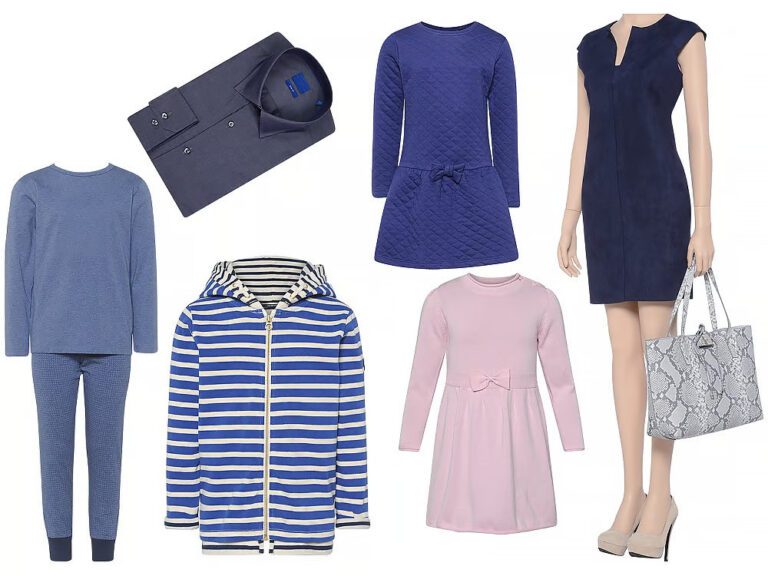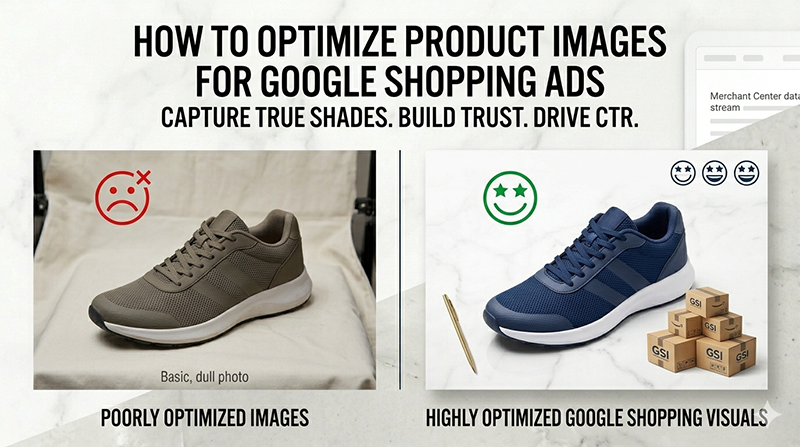
If your brand runs paid acquisition campaigns for a large clothing catalog, learning how to optimize product images for Google Shopping is the fastest way to lower your customer acquisition cost. When a shopper searches for a merino wool base layer, a tailored linen blazer, or a heavyweight hoodie, Google serves a visual carousel right at the top of the page. Your product thumbnail accounts for nearly 80% of the physical real estate inside that ad unit.
In that split second before a click happens, shoppers are not reading your full product description. They are judging fabric weight, fit, and brand credibility entirely through your thumbnail. If your imagery looks flat, poorly lit, or inconsistent next to a competitor, your click-through rate (CTR) drops and your cost-per-click (CPC) climbs.
For high-growth retail brands selling on Shopify, Amazon, and WooCommerce, ad spend efficiency starts in post-production. When you optimize product images for Google Shopping, you turn passive impressions into high-intent traffic that actually converts on your product pages.
Why You Must Optimize Product Images for Google Shopping in 2027
Google Shopping functions like a digital department store window where five to ten competing brands sit side by side. Unlike traditional text-based search ads where copywriters can test dozens of headlines, Shopping ads lock you into a rigid format: an image, a title, a price, and a brand name. Because price and product titles often look nearly identical across competing retailers, the visual asset becomes the primary differentiator.
Brands that systematically optimize product images for Google Shopping consistently outperform competitors bidding on the exact same keywords. A crisp, well-proportioned garment image draws the human eye immediately, signaling retail authority before the buyer even looks at the price tag.
The Direct Link Between Apparel Photo Editing and Ad Spend Efficiency
Google’s ad auction rewards relevance and historical engagement. When your product thumbnails generate a higher CTR than the category benchmark, Google’s algorithm views your listing as highly relevant to the shopper’s query. Over time, higher engagement helps your products win better placement in the Shopping carousel without forcing you to blindly raise your max CPC bids.
Investing in professional e-commerce photo editing services directly protects your paid media budget. Instead of burning thousands of dollars pushing traffic through underwhelming studio shots, structured apparel photo editing ensures every impression works as hard as possible to earn the click.
Google Merchant Center Technical Specs: How to Optimize Product Images for Google Shopping Feeds
Before you can win on aesthetics, your product catalog has to clear Google Merchant Center’s strict automated compliance filters. Google scans millions of retail feeds daily, and minor technical violations can trigger sudden item disapprovals or account suspensions right in the middle of a peak seasonal launch.
To properly optimize product images for Google Shopping, your creative production team must align its export settings with Google’s core technical requirements. While Google allows a minimum resolution of 250 x 250 pixels for general goods, apparel items require a strict minimum of 250 x 250 pixels and a recommended resolution of at least 1500 x 1500 pixels to 2000 x 2000 pixels. High-resolution square (1:1) or vertical (4:5) ratios give mobile shoppers the ability to pinch and zoom into stitching, weave, and garment construction without pixelation.
- File Formats: Export assets in clean JPEG (.jpg) or PNG (.png) formats using the sRGB color space so hues render accurately across mobile OLED screens and desktop monitors.
- Framing and Padding: Ensure the garment occupies between 75% and 90% of the total canvas area. Leave balanced margins around the edges so sleeves or hemlines are never cropped off in Google’s mobile grid.
- Zero Promotional Overlays: Never place “Free Shipping” badges, discount percentages, brand logos, or watermarks over the primary image feed. Google’s vision AI will automatically reject the SKU.
- Pure Background Isolation: Use a solid white (
#FFFFFF) or light neutral background for primary product listings to maintain compliance across multi-channel feeds.
Avoiding Disapprovals Through High-Volume Image Processing
When an enterprise apparel brand drops a new seasonal line with 800 SKUs and four colorways per style, manual one-off adjustments by an overwhelmed in-house designer inevitably lead to errors. One crooked crop or an unremoved studio prop in the corner of a frame can stall an entire campaign launch.
Implementing standardized high-volume image processing eliminates those bottlenecks. By establishing fixed canvas templates, automated margin guides, and strict human quality control, your entire catalog feeds into Google Merchant Center, Shopify, and WooCommerce without a single compliance rejection.
Apparel-Specific Strategies to Optimize Product Images for Google Shopping
Clothing is notoriously difficult to photograph and sell online because garments lack a rigid structure of their own. A luxury cashmere sweater laid flat on a table often looks lifeless, while a poorly fitted live-model shot can distract from the cut of the garment itself.
When you optimize product images for Google Shopping in the fashion and apparel sector, your goal is to communicate fit, drape, and tactile quality inside a tiny mobile thumbnail. Achieving that level of clarity requires specialized post-production techniques tailored specifically to textiles.
Using Ghost Mannequin Techniques for 3D Apparel Depth
For brands that want the clean focus of still-life photography without the flatness of a tabletop laydown, the ghost mannequin (or invisible mannequin) effect is the industry gold standard. Photographers shoot the garment on a matte mannequin and take separate interior shots of the neck label, inner lining, and cuffs.
During post-production, specialist retouchers manually isolate the garment, remove the physical mannequin pieces, and composite the interior neck and hem shots seamlessly into the frame. The result is a hollow, three-dimensional presentation that shows the true silhouette and drape of a jacket, shirt, or dress. In a crowded Google Shopping grid, ghost mannequin imagery immediately looks structured, tailored, and retail-ready.
Precision Color Matching to Eliminate Costly Customer Returns
Studio strobes and camera sensors frequently struggle with complex fabric dyes—especially navy blues, burgundies, heather grays, and neon activewear tones. If a shopper clicks a Google Shopping ad expecting a deep olive utility jacket and receives a garment that looks washed-out khaki in person, that order turns into an expensive return.
Accurate color matching bridges the gap between physical fabric swatches and digital screens. Expert retouchers use targeted channel masking in Adobe Photoshop to calibrate hues, saturation, and luminance against physical Pantone references or master sample garments. Furthermore, when a single garment is sold in ten colorways, precision recoloring allows brands to shoot one master sample and generate nine accurate color variants—saving thousands in studio time while helping you optimize product images for Google Shopping across every SKU variant.
Advanced Retouching for Fabric Texture and Drape
Even the best studio styling leaves behind distracting pinch clips, harsh steamer creases, lint, and uneven hemlines. At the same time, over-smoothing a garment with cheap automated filters destroys the natural weave of denim, knitwear, or silk.
High-end apparel retouching relies on frequency separation—a technique that separates a garment’s fine surface texture (the fabric weave, stitching, and ribbing) from its underlying tone and shadow structure. This allows a skilled retoucher to iron out deep packaging wrinkles and symmetrical imbalances while keeping every thread crisp and authentic.
Lifestyle vs. Studio Shots: A/B Testing When You Optimize Product Images for Google Shopping
One of the biggest strategic questions e-commerce directors face is whether to put a clean studio silhouette or an on-model lifestyle photo in the primary image_link feed attribute. The honest answer depends on your price point, garment category, and how your competitors appear in the SERP.
Standard studio shots on pure white backgrounds offer maximum visual clarity for technical apparel, basics, footwear, and menswear. Because there is no background clutter, the garment pops off the screen even when rendered at 150 pixels wide on a smartphone. Conversely, lifestyle or on-model studio imagery often drives stronger engagement for occasion wear, streetwear, and drape-heavy women’s fashion where movement and styling context matter.
The smartest way to optimize product images for Google Shopping is to leverage both formats strategically inside your Merchant Center feed:
- Primary Image (
image_link): Test a high-contrast, crisp ghost mannequin or clean on-model studio shot with zero background distractions so the shopper instantly recognizes the item type and cut. - Additional Images (
additional_image_link): Upload up to 10 secondary angles—including back views, macro fabric texture close-ups, and lifestyle context shots—so shoppers browsing the expanded Google Shopping product tab see the full story. - Feed Rules & Custom Labels: Use feed management tools to split-test primary thumbnails across your top 20% revenue-generating SKUs and measure the exact CTR lift over a 30-day window.
Scaling Your Catalog Workflow: How to Optimize Product Images for Google Shopping at High Volume
Growing e-commerce brands rarely struggle to edit five hero images for a homepage banner. The real operational crisis hits when a brand needs to process 1,200 new product images between a Tuesday studio shoot and a Friday multi-channel launch across Shopify, Amazon, and Google Shopping.
Many teams attempt to speed up this process using one-click AI background removers. While automated tools might work on a hard plastic water bottle, they routinely fail on apparel. Automated algorithms chew through fine knitwear edges, sheer lace, faux fur, and stray hair, leaving behind jagged halos and missing garment details that look amateurish on high-resolution displays.
To truly optimize product images for Google Shopping at scale, brands need a dedicated human post-production pipeline. Manual, hand-drawn edge isolation ensures that fuzzy wool sweaters, intricate embroidery, and delicate straps retain their natural softness against a clean studio background.
Building a Reliable Post-Production Pipeline for Multi-Channel Retail
When your brand sells simultaneously on your own direct-to-consumer store and third-party marketplaces, asset consistency is everything. Amazon enforces strict pure-white background rules (RGB 255, 255, 255), Shopify stores often favor subtle warm-gray editorial backdrops, and Google Shopping rewards high-contrast framing.
By partnering with a specialized production team like Photo Fix Team, you don’t have to shoot or edit your catalog twice. A structured high-volume image processing workflow creates master layered files with clean background separation, accurate color matching, and symmetrical retouching. From that single master file, your team can instantly export tailored crops and background specs for Amazon, Shopify, WooCommerce, and Google Merchant Center in one seamless batch.
Partner With Photo Fix Team to Optimize Product Images for Google Shopping
Your paid media team works tirelessly to dial in bidding strategies, negative keywords, and audience segments. Don’t let unpolished, inconsistent product photography bottleneck your return on ad spend. When you optimize product images for Google Shopping with expert human craftsmanship, every dollar you spend on ads works harder to bring qualified buyers to your store.
At Photo Fix Team, we specialize in high-volume apparel photo editing for fast-growing e-commerce brands across the US, UK, and Europe. Whether you process 500 or 5,000 SKUs a month, our dedicated retouchers deliver flawless ghost mannequin composites, true-to-life color matching, wrinkle removal, and marketplace-compliant formatting with fast, predictable turnaround times.
Ready to upgrade your product feed and boost your retail CTR? Visit Photo Fix Team today to request a free trial edit on your toughest apparel shots and see how precision post-production transforms your catalog.
Photo Fix Team delivers fast, pixel-perfect eCommerce photo editing for online stores, brands, and photographers — background removal, ghost mannequin, retouching, color correction, and bulk catalog editing.
✓ 24–48h Turnaround • ✓ 100% Quality Guarantee • ✓ No Credit Card Required