Spring collections are about freshness, color, and new arrivals—but for ecommerce brands, seasonal success depends on more than trend forecasting. If your images do not present those spring tones clearly and consistently, shoppers may scroll past, lose confidence, or receive products that look different from what they expected online. That is why an ecommerce photo editing service matters so much for fashion brands launching spring inventory.
Spring Fashion 2025 brings renewed focus to soft tones, bright accents, and wearable statement colors. For online stores, the opportunity is not just to follow the trend—it is to display those colors in a way that looks accurate, premium, and marketplace-ready. In this guide, we will look at how ecommerce brands can turn spring color trends into stronger product images, better collection pages, and a more polished shopping experience.
Why Spring Color Trends Matter for Fashion Ecommerce
In fashion ecommerce, color influences almost every buying decision. Customers cannot touch fabric or compare items in person, so they rely heavily on product images to judge shade, tone, texture, and style.
That becomes even more important during seasonal launches. Spring collections usually introduce:
- lighter color stories
- softer fabrics
- floral or pastel-inspired palettes
- brighter lifestyle imagery
- collection pages built around freshness and renewal
If the colors in your apparel images appear dull, too cool, too warm, or inconsistent from one product to the next, the entire collection can feel less appealing.
For fashion brands, this creates a simple truth: seasonal color trends only help sales when product images present them correctly.
What Spring Fashion 2025 Means for Online Stores
Spring 2025 style direction is likely to center around clean, wearable palettes with a mix of soft neutrals, fresh botanical tones, pastel-inspired shades, and a few brighter statement colors. For ecommerce stores, these trends affect much more than product selection. They influence how you should photograph, edit, and display your collection.
For example:
- soft pastel garments need careful exposure so they do not look washed out
- bright spring tones need accurate color correction so they do not become oversaturated
- white or cream apparel needs clean background control to avoid blending into the page
- floral prints and textured materials need detail-retaining retouching
This is where fashion ecommerce photo editing becomes part of merchandising, not just design support.
Why Color Accuracy Is a Sales Issue, Not Just a Design Issue
Color mistakes in fashion ecommerce can lead to:
- lower conversion rates
- more customer hesitation
- more returns
- negative reviews
- reduced trust in your store
When customers order a dress that looked blush pink but arrives looking beige, the problem is not only photography—it is a trust problem.
A strong editing workflow helps prevent that by improving:
- white balance
- exposure consistency
- color matching
- shadow control
- catalog alignment
For spring collections, this matters even more because subtle differences between shades are often part of the product appeal.
How to Present Spring Fashion Colors Better in Ecommerce Images
Below are the most effective ways to align a fashion trend post with actual ecommerce buyer intent.
1. Use Color Correction That Preserves the Real Garment Tone
Spring apparel often includes delicate shades that are easy to misrepresent online. Soft blue, pale yellow, mint, lavender, blush, cream, and warm neutrals can all shift depending on lighting, camera settings, and display conditions.
That is why color correction for product photos is one of the most important parts of fashion editing.
Good color correction should:
- match the garment as closely as possible to real life
- keep white fabrics from looking blue or yellow
- preserve detail in bright and pastel tones
- create consistency across the collection
This is especially important when customers compare multiple color variants on one product page.
2. Keep Backgrounds Clean So the Garment Color Stands Out
Seasonal clothing images often work best when the product remains the hero. Busy or inconsistent backgrounds can distract from the color story and weaken the visual impact of the collection.
A clean background helps:
- highlight the garment tone
- improve category page consistency
- make collection pages easier to scan
- support marketplace compliance
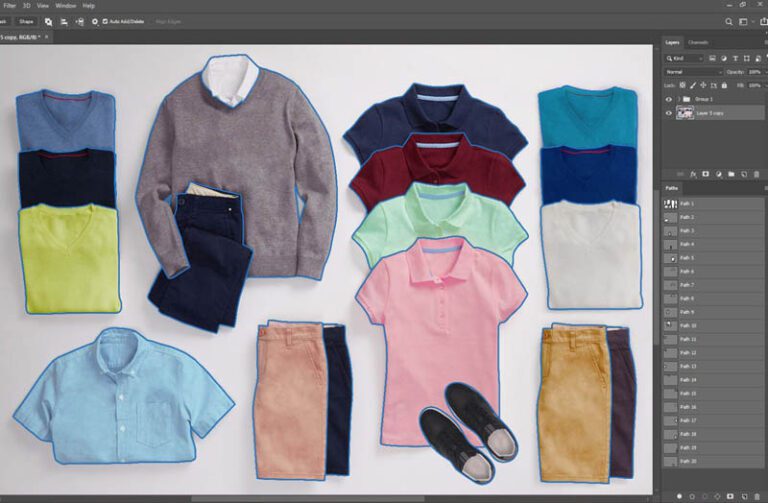
For many stores, white or light neutral backgrounds still work best for core product images. A professional background removal service helps fashion brands keep product pages clean and consistent without needing a full reshoot.
3. Standardize Apparel Presentation Across the Collection
One of the biggest mistakes fashion stores make during seasonal launches is inconsistency. Some images are cropped tightly, others too loosely. Some are bright and cool, others warm and dark. Some products are centered, while others sit too low or too high in the frame.
That inconsistency makes the store feel less polished, even when the products themselves are strong.
For Spring 2025 collection pages, standardize:
- image dimensions
- crop ratios
- garment placement
- zoom level
- shadow style
- background style
- editing tone
Consistent ecommerce product images help the customer focus on the products instead of noticing visual differences from image to image.
4. Use Ghost Mannequin Editing for a More Premium Apparel Look
Flat apparel images can work, but they often lack structure. Visible mannequins can also distract from the garment. For many fashion ecommerce brands, ghost mannequin service creates the best balance.
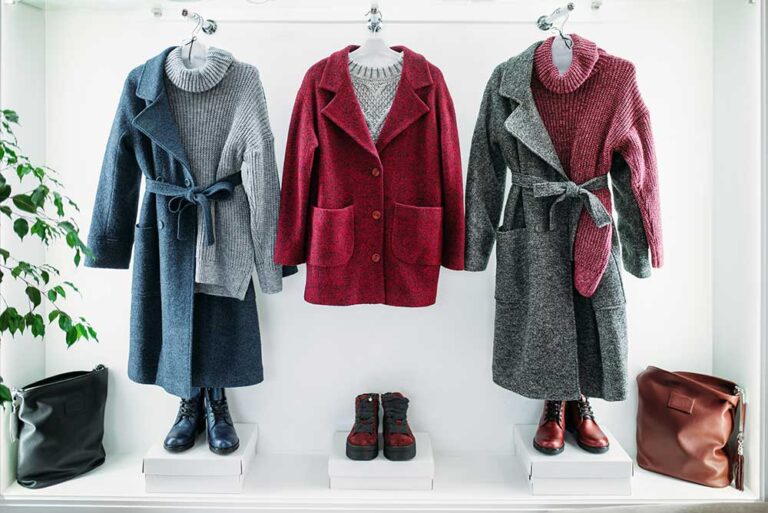
This editing style removes the mannequin while preserving the natural shape of the clothing. It helps products look more premium, more dimensional, and easier to evaluate online.
Ghost mannequin works especially well for:
- shirts
- blazers
- dresses
- jackets
- tops
- uniforms
- seasonal fashion drops
For spring collections, it helps lighter garments maintain form without feeling cluttered.
5. Retouch Apparel Images Without Making Them Look Unreal
Retouching should improve presentation, not alter reality. In fashion ecommerce, shoppers still want the garment to look honest.
Strong clothing photo retouching should remove distractions like:
- dust
- lint
- minor wrinkles
- loose threads
- background flaws
- uneven shadows
But it should not:
- change the garment color too much
- reshape the item unrealistically
- erase texture
- make fabrics look plastic or fake
Spring collections often depend on light materials and subtle texture, so natural retouching is essential.
6. Add Detail Images for Prints, Texture, and Fabric Finish
A spring fashion collection is rarely just about the overall silhouette. Buyers often want to see:
- fabric texture
- print details
- stitching
- button finish
- sleeve shape
- collar structure
- lining or drape
Detail images support confidence and reduce uncertainty. They are especially useful for:
- floral garments
- textured fabrics
- lightweight spring jackets
- knitwear
- embroidered pieces
- premium fabrics
When paired with consistent editing, detail shots make your product pages more informative and more conversion-friendly.
7. Optimize Images for Shopify, Amazon, and Fashion Marketplaces
Seasonal collections should not only look attractive—they also need to perform well across platforms.
For example:
- Shopify product pages benefit from consistent visual merchandising
- Amazon apparel listings need clear, compliant product images
- marketplace product grids need standardized thumbnails
- mobile shoppers need images that load quickly and still show detail
That is why Shopify fashion product images and Amazon apparel image editing require more than general design editing. They need clean output, accurate product presentation, and platform-aware formatting.
8. Build Collection Pages That Feel Seasonal but Still Professional
Spring launches often include banners, campaign visuals, and category pages that feel more lifestyle-focused. That is great for branding—but your core product images still need consistency.
A smart approach is:
- keep product pages clean and standardized
- use campaign banners for creative expression
- use category pages to highlight seasonal color stories
- maintain accurate editing across all SKUs
That way, your collection can feel fresh and seasonal without losing the structure ecommerce shoppers expect.
Common Mistakes Fashion Ecommerce Brands Make During Seasonal Launches
Even good collections can underperform when image execution is weak. Here are the most common mistakes:
Inconsistent color from one product to another
This makes the collection feel disorganized and weakens trust.
Over-editing soft spring shades
Pastels can quickly become too bright, too white, or too flat.
Poor background cleanup
Messy cutouts and uneven white backgrounds hurt premium presentation.
Missing detail images
Customers cannot inspect the garment properly and hesitate to buy.
Uneven cropping across the collection
Collection pages feel messy, especially on mobile and product grids.
No clear editing workflow
As new arrivals are added, the catalog starts losing consistency.
Why Outsourcing Spring Collection Editing Can Help
For fashion ecommerce teams, seasonal launches often mean:
- new arrivals coming in fast
- multiple SKUs and color variants
- pressure to launch on time
- the need for consistent merchandising across the site
That is where outsourcing to a professional ecommerce photo editing service becomes practical. Instead of struggling with uneven in-house edits, brands can use a workflow that supports:
- fast turnaround
- quality checks
- consistent retouching
- accurate color correction
- background cleanup
- ghost mannequin editing
- catalog-wide visual consistency
For apparel sellers, this is often more efficient than trying to edit every product image manually.
Final Thoughts
A spring fashion post can absolutely support your ecommerce goals—but only when it is written for fashion sellers, not just fashion readers.
The right approach is not simply to talk about Spring 2025 color trends. It is to explain how those trends should be presented in online stores through accurate editing, clean product presentation, and consistent apparel imagery.
If your team is preparing a seasonal launch, product image quality can directly affect how customers perceive the collection. A professional ecommerce photo editing service helps fashion brands turn raw apparel images into clean, polished, marketplace-ready visuals that support clicks, trust, and conversions.
At Photo Fix Team, we help apparel brands, online boutiques, Shopify stores, and marketplace sellers improve product images with background removal, color correction, ghost mannequin editing, and apparel retouching—delivered with fast turnaround, secure workflow, and quality checks on every order.
Frequently Asked Questions
Find answers to commonly asked questions about our products and services.