
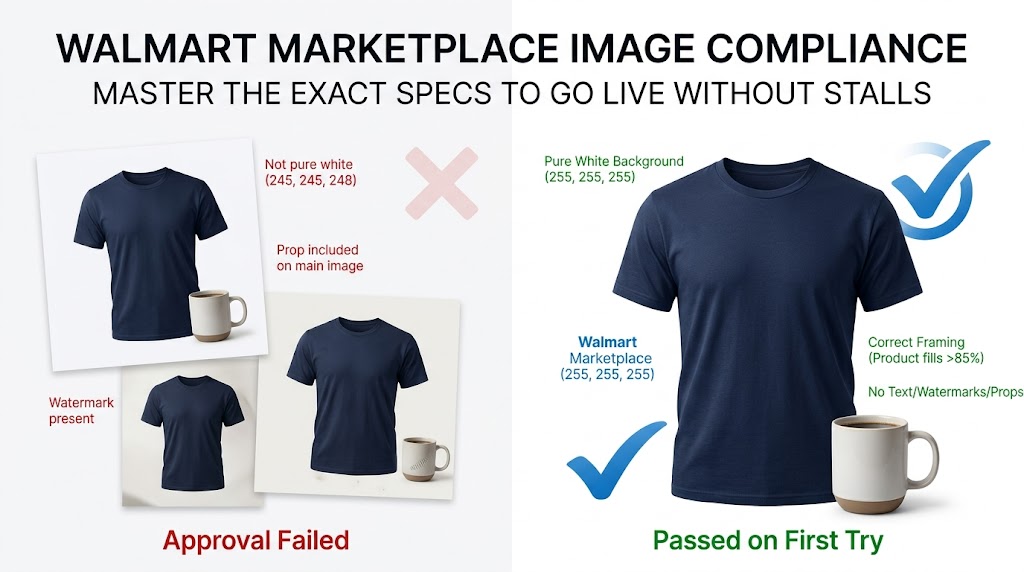
Getting your listings stuck in “Unpublished” status is one of the most frustrating parts of selling on Walmart. The cause is almost always your images. Unlike Amazon, Walmart partially reviews listings by hand, so a single violation of the Walmart Marketplace image guidelines can stall your launch for days.
This guide breaks down the exact Walmart Marketplace image guidelines for 2026. Follow these rules and your listings will pass approval on the first try, every time.
Why Walmart Image Compliance Matters More Than You Think
Walmart Marketplace now hosts over 200,000 active sellers competing for the same buyers. Following the Walmart Marketplace image guidelines is the fastest lever you can pull to stand out and get approved quickly.
Image quality directly affects two things: your approval status and your Content Quality Score. Walmart confirms that images account for a meaningful slice of that score, which influences your search ranking and Buy Box eligibility.
Poor images do more than hurt rankings. They increase returns, trigger negative reviews, and quietly cap your conversion rate. Getting them right is non-negotiable.
The Core Walmart Marketplace Image Guidelines (2026)
Walmart publishes its official image requirements in the Walmart Seller Center image guidelines. Understanding these published standards is the foundation of getting every listing approved fast.
Here are the official file requirements pulled directly from Walmart’s Seller Center documentation:
- File Format: JPEG, JPG, PNG, or BMP (GIF files are not permitted)
- Color Format: RGB only
- File Size: 5MB or less
- Bit Depth: 8 bits per pixel
- Recommended Pixel Dimensions: 2200 x 2200 px
- Minimum Pixel Dimensions for Zoom: 1500 x 1500 px
- Aspect Ratio: 1:1 (perfect square)
- Background: Seamless white (255, 255, 255 RGB)
- Swatch Dimensions: 100 x 100 px
These numbers are the foundation. Everything else builds on top of them.
A Note on File Naming
Walmart recommends naming each image file with the product’s 14-digit GTIN. This small habit speeds up bulk uploads and reduces matching errors across large catalogs.
It feels minor, but for sellers uploading hundreds of SKUs, clean file names prevent costly mix-ups.
Main Image Rules: Where Most Sellers Fail
Your main image carries the strictest rules in the Walmart Marketplace image guidelines. It is the first thing a shopper sees, so Walmart polices it closely.
Get this image wrong and nothing else matters. Here is what Walmart demands for every primary product photo.
The Seamless White Background Requirement
Your main image must sit on a pure white background measured at exactly 255, 255, 255 RGB. “Almost white” or light gray will fail review.
This is the number one reason listings get rejected. A background that looks white on your monitor can still register as off-white in Walmart’s system.
Professional background removal solves this instantly. The goal is a clean, seamless white that makes your product pop without any visible edges or shadows bleeding into the frame.
Cropping and Framing
Walmart wants the product cropped as close to the frame edge as possible. Excessive empty space around the item signals a low-effort listing.
Follow these framing rules for the main image:
- Fill the frame with the product, leaving only a small clean margin
- Center the item so it reads clearly at thumbnail size
- Never enlarge a low-resolution photo to fill space, as this destroys quality
- Keep the product in sharp focus and professionally lit
What Your Main Image Cannot Contain
Walmart bans several elements from the primary image. Including any of them guarantees a rejection.
Your main image must not show:
- Watermarks, your seller name, or your logo
- Accessories or props that are not included with the product
- Text overlays, promotional language, or pricing claims
- Walmart, Amazon, or any other retailer logos
- Languages other than English
- Borders, badges, or “sold out” indicators
The rule is simple. Show the product, nothing else.
Secondary and Additional Images
Walmart recommends uploading a minimum of four images per listing. More images build trust and reduce returns, which protects your account health.
Secondary images give you room to sell where the main image cannot. Use them to answer the questions a buyer asks before clicking “Add to Cart.”
Strong additional images include:
- Back, side, and detailed angle views
- Close-ups of key features or materials
- The product shown in an expected real-world environment
- Scale references that show actual size
- Infographics highlighting benefits (allowed on secondary images, not the main)
For variant groups, keep your image sets consistent. If your primary item shows front, back, and side views, every variant in the group should follow the same pattern.
Swatch and Variant Image Specifications
Swatches help shoppers pick the right color or pattern without guessing. Walmart treats them as a separate image type with its own spec.
Swatch images must be 100 x 100 pixels and should clearly represent the visible difference between variants. They appear as clickable thumbnails beneath the variant selector.
If your product comes in multiple colors or prints, swatches are not optional. They directly improve the shopping experience and your conversion rate.
Image URL and Hosting Requirements
Many sellers upload images by URL rather than direct file upload. Walmart accepts this, but the URL rules trip up a lot of catalogs.
For a URL to pass, it must meet these conditions:
- The URL must end in a valid image file type, such as .jpg or .png
- The communication port must be 8080, 80, 443, or 8443
- The URL must be publicly accessible
- It cannot contain a query string or unencoded special characters
Avoid Dropbox links and HTML-based image pages entirely. Most properly hosted Amazon image URLs will work if they meet the specs above.
The Pre-Approval Checklist
Before you hit submit, run every image through this quick checklist. It catches the errors that cause first-round rejections.
- Is the file a JPEG, PNG, or BMP under 5MB?
- Is it at least 1500 x 1500 px, ideally 2200 x 2200 px?
- Is the aspect ratio a perfect 1:1 square?
- Is the main image background pure white at 255, 255, 255?
- Is the product cropped tight and centered?
- Are watermarks, logos, and props removed from the main image?
- Do you have at least four total images?
- Are variant image sets consistent across the group?
If every box is checked, your listing is ready to pass on the first try.
Stop Guessing. Get a Free Test Image.
Meeting every one of these specs by hand is slow, especially across a large catalog. One wrong background value can cost you days of lost sales.
That is exactly what we fix at Photo Fix Team. We handle background removal, white-background compliance, cropping, and resizing so your images pass Walmart approval the first time.
See the quality for yourself. Send us one product photo and we will edit it to full Walmart compliance, completely free. Claim your Free Test Image here and watch how a perfectly compliant listing should look.
Walmart vs. Amazon: Key Image Differences
If you sell on both platforms, do not copy and paste your image strategy. The two marketplaces enforce different standards.
Walmart and Amazon share some specs but diverge in important ways:
- Background: Both require pure white main images, but Walmart reviews them partly by hand, making compliance stricter
- Resolution: Walmart recommends 2200 x 2200 px; Amazon requires the longest side to hit at least 1600 px for zoom
- File formats: Walmart accepts BMP; Amazon does not prioritize it
- Review process: Amazon leans on automation, while Walmart’s manual checks mean borderline images fail more often
Treat each platform as its own project. Reusing Amazon files without checking the Walmart Marketplace image guidelines is a common, avoidable mistake that leads to rejection.
Frequently Asked Questions
Can I use stock photos on Walmart Marketplace?
No. Walmart prohibits stock photos and requires actual images of the product you are selling. Using generic stock imagery violates the Walmart Marketplace image guidelines and will get your listing unpublished immediately.
What happens if my images don’t meet the requirements?
Violating the Walmart Marketplace image guidelines may cause your product to be unpublished. The listing stays inactive until you replace the image with a compliant version that meets all required specs.
How many images should I upload per listing?
Walmart recommends a minimum of four images per listing. More high-quality images build buyer trust and reduce return rates.
Does image quality affect my Walmart search ranking?
Yes. Images factor into your Content Quality Score, which influences search visibility and Buy Box eligibility. Better images mean better placement.
What is the most common reason for image rejection?
An off-white background is the leading cause. Walmart requires an exact 255, 255, 255 RGB white, and anything slightly gray or cream will fail.
Final Word
The Walmart Marketplace image guidelines are strict, but they are also predictable. Once you know the exact specs, passing approval becomes a repeatable process rather than a guessing game. Bookmark these Walmart Marketplace image guidelines and check every listing against them before submitting.
Nail the white background, hit the right dimensions, and keep your main image clean. Do that and your listings go live the first time, every time. When you want it handled for you, Photo Fix Team is one free test image away.
🚀 Ready to Grow Your eCommerce Business with Professional Clipping Path Services?
Photo Fix Team delivers fast, precise, and affordable clipping path services for eCommerce businesses of all sizes — background removal, white background compliance, ghost mannequin, shadow effects, color correction, and bulk catalog editing with guaranteed quality.
Get a Free Quote Today →