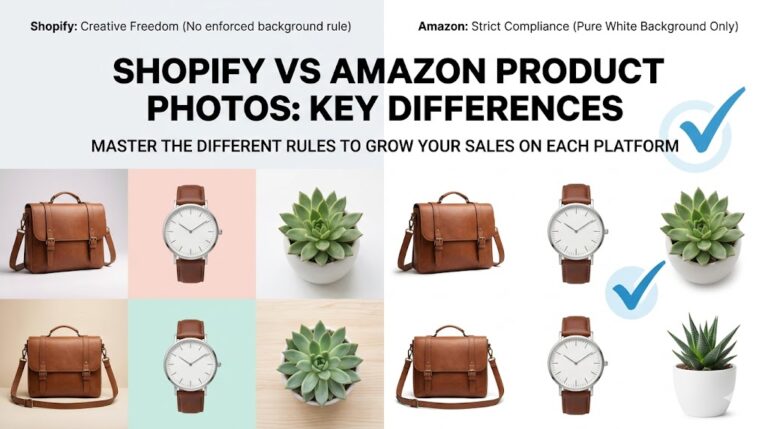
*(Covers CTR improvement, clean cutouts, consistent variation framing — straight from your Amazon page benefits)*
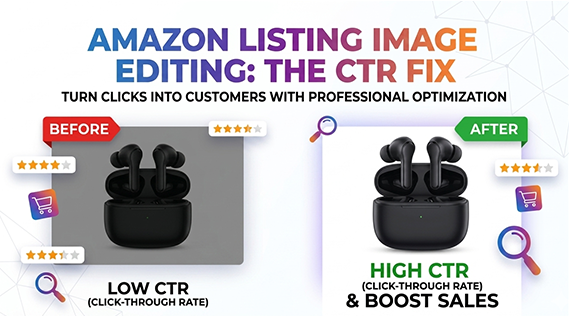
You’ve done the research, found a winning product, written compelling bullet points, and set a competitive price. Yet your Amazon listing still isn’t getting the clicks it deserves. Sound familiar? The culprit is often hiding in plain sight — your product images.
In the hyper-visual world of Amazon, your main image is your billboard. Shoppers scroll through hundreds of results in seconds, and your image has roughly 200 milliseconds to make an impression. If it fails, no amount of keyword optimization or pricing strategy will save your click-through rate (CTR). The good news? Amazon listing image editing is one of the most powerful — and most overlooked — levers you can pull to dramatically increase clicks and conversions.
Why CTR Is the Most Important Metric You Might Be Ignoring
Click-through rate measures how often shoppers click your listing after seeing it in search results. A low CTR tells Amazon’s algorithm that your product isn’t relevant or appealing — and the algorithm responds by pushing you further down the rankings, creating a painful downward spiral.
A well-optimized product image — produced through professional Amazon listing image editing — can increase CTR by 20–40% without changing a single word of your listing copy. Here’s what Amazon’s own data and successful sellers consistently confirm: images that are clean, professional, and visually distinct from competitors dominate click-through rates in every product category.
What Makes Shoppers Click?
Before diving into the editing techniques, it helps to understand what the eye responds to in a sea of thumbnails:
- Clarity and crispness — Blurry or poorly lit images signal low quality immediately
- Pure white backgrounds — Amazon’s main image requirement, and a visual standard shoppers trust
- Product prominence — The product should fill 85%+ of the image frame
- Accurate color rendering — Unexpected color on delivery is a top reason for returns and negative reviews
- Clean edges — Ragged cutouts, hair-like artifacts, or shadows bleeding into the background are immediate trust killers
The Power of Clean Product Cutouts
A clean product cutout — also called a clipping path or background removal — is the foundation of every professional Amazon main image. Even if your product photography is excellent, an imprecise cutout can ruin the final result.
Common cutout problems that kill CTR include:
- Fringe pixels or halos around the product edges (especially visible on white backgrounds)
- Inconsistent edges that look jagged or “pixel-y” when zoomed in
- Lost detail in fine textures like fabric weave, mesh, or transparent materials
- Shadows or reflections from the original background bleeding through
Manual Clipping Path vs. Automated Tools
AI-powered background removal tools have improved dramatically, but they still struggle with complex edges — think jewelry with delicate chains, garments with fur trim, or electronics with thin antennae. For Amazon listings where zoomed-in scrutiny is common, a manually traced clipping path remains the gold standard.
A professional editor using the pen tool in Photoshop can trace around complex product edges with pixel-level precision, then place the cutout on a pure white background (#FFFFFF) that meets Amazon’s technical requirements. This isn’t just about aesthetics — it’s about building the kind of visual trust that converts browsers into buyers.
Actionable tip: Before publishing any listing, zoom into your main image at 100% in Photoshop and inspect the edges. If you see any color fringing, uneven transitions, or background bleed, your cutout needs refinement.
Consistent Variation Framing: The Silent Sales Killer
If you sell products with multiple variations — different colors, sizes, or styles — inconsistent framing across your variation images is costing you sales. Here’s why: when a shopper clicks through a color variation, they expect a seamless visual experience. If your red version is shot from slightly above and fills 70% of the frame, but your blue version is shot from eye level and fills 50% of the frame, the subconscious alarm bells go off.
Shoppers begin to wonder: “Are these really the same quality product? Is this a different manufacturer?” That doubt kills confidence — and confidence kills conversions.
The Framing Consistency Checklist
Professional Amazon listing image editing addresses variation consistency by standardizing:
- Zoom level — Every variation should occupy the same percentage of the image frame
- Camera angle — Front-facing, three-quarter, or overhead should be consistent across all SKUs
- Shadow treatment — If you use a drop shadow on one variation, use the same shadow style on all
- White balance and brightness — Color accuracy must be calibrated so each variation looks true-to-life and consistent with the others
- Product orientation — The product should face the same direction (typically slightly right-of-center) across all variations
This level of consistency signals professionalism to Amazon’s algorithm and, more importantly, to your shoppers. Top-performing Amazon stores treat their entire variation gallery like a cohesive brand campaign, not a collection of individually edited images.
How Professional Image Editing Drives Amazon Conversions
The impact of professional Amazon listing image editing doesn’t stop at the main image. Your full gallery — typically 7–9 images — works together as a conversion funnel. Each image has a job to do, and professional editing ensures every image does that job effectively.
Beyond the Main Image: The Full Gallery Strategy
Here’s how professional editing enhances each image type in your gallery:
- Lifestyle images — Background replacement and color grading ensure lifestyle shots feel aspirational without looking artificial or stock-photo generic
- Infographic overlays — Text and callout graphics need to sit cleanly on your product images; professional compositing ensures perfect alignment and readability
- Size and dimension images — Accurate scaling with clean product cutouts helps customers understand product dimensions without handling the item
- Detail and close-up shots — Retouching removes minor imperfections that a camera captures but the human eye forgives in person, preventing unwarranted negative reviews
- Before/after comparisons — For beauty, cleaning, or health products, professionally composed split images build immediate credibility
The Conversion Math: Why Image Editing Pays for Itself
Consider this: if your listing receives 1,000 impressions per month at a 3% CTR, that’s 30 clicks. Improving CTR to just 5% through better images gives you 50 clicks — a 67% increase in traffic with the same ad spend and the same keyword ranking. At a 10% conversion rate, that’s the difference between 3 sales and 5 sales per month, per keyword, per listing.
Multiply that across multiple keywords, multiple listings, and a 12-month period, and professional image editing delivers an ROI that dwarfs most other Amazon optimization investments.
Real Examples: Image Editing Wins on Amazon
Case 1: Apparel Seller With Inconsistent Variation Images
An apparel seller with 12 color variations was experiencing high click-through on the main blue variant but significantly lower clicks on other colors. The issue? Each variant had been photographed and edited separately by different photographers, resulting in varying brightness levels, slightly different camera angles, and inconsistent shadow treatment.
After a complete re-edit to standardize all 12 variants — consistent brightness, matching camera angles, and uniform drop shadows — the seller saw overall variant CTR increase by 31% within 60 days. The algorithm rewarded the improved consistency with higher placement across all variants.
Case 2: Electronics Accessory With Poor Main Image Cutout
A USB-C hub listing requiring Amazon listing image editing had a main image with a subtle color halo around the edges — nearly invisible at a glance but clearly visible when thumbnails were compared side-by-side with competitor listings. After a professional re-clipping of the product with pen tool precision, the main image appeared noticeably cleaner in search results thumbnails. CTR improved by 24% in the first month, while the product’s search ranking improved by 15 positions over the following 45 days.
Actionable Tips to Improve Your Amazon Listing Images Today
Whether you’re launching a new product or reviving an underperforming listing, here are concrete steps to implement immediately:
- Audit your main image — Download your current main image, open it at 100% zoom, and check edges carefully. Any imperfection visible at thumbnail size is costing you clicks.
- Verify your white background — Use Photoshop’s color picker to confirm your background is pure white (RGB 255, 255, 255). Off-white backgrounds can cause Amazon to suppress your listing or reject your image.
- Standardize your variation gallery — Create a framing template for your product: same zoom level, same angle, same position. Apply it to every variation.
- Invest in your secondary images — Most sellers overspend on their main image and neglect the gallery. Your secondary images are where conversion decisions are made. This is where expert Amazon listing image editing makes the biggest difference.
- Test A/B with Amazon’s Manage Your Experiments — If you’re brand registered, use Amazon’s native split-testing tool to measure the CTR impact of different main images with real data.
- Optimize image file size without sacrificing quality — Large files load slowly on mobile; use JPEG with 80–85% quality for the optimal balance between load speed and visual crispness.
Choosing the Right Amazon Image Editing Partner
Not all Amazon listing image editing services deliver the precision that Amazon listings demand. When evaluating a service, look for:
- Manual clipping path capability (not just AI auto-removal) for complex products
- Experience with Amazon’s specific image requirements and technical standards
- Batch processing capability for sellers with large catalogs
- Quick turnaround times that align with your restock and launch schedules
- Revision policies that ensure you get images you’re genuinely satisfied with
At PhotoFixTeam, we specialize in precision Amazon listing image editing — from clipping paths and background removal to full gallery optimization and variation standardization. Our team works with Amazon sellers across every category, delivering images that meet Amazon’s technical standards while maximizing visual impact.
Frequently Asked Questions About Amazon Listing Image Editing
What is the best image format for Amazon product listings?
Amazon accepts JPEG, PNG, GIF, and TIFF formats, but JPEG is recommended for most product images. Use a minimum resolution of 1000px on the shortest side to enable the zoom feature, which Amazon’s data shows significantly improves conversion rates. Aim for 2000x2000px for optimal zoom quality.
How do I know if my Amazon images are hurting my CTR?
Use Amazon Brand Analytics (for brand-registered sellers) to compare your CTR against category benchmarks. If your CTR is below the category average, images are likely the first thing to optimize. You can also run a visual audit by searching for your main keyword and comparing your thumbnail to the top 3 results — if your image looks less sharp, less bright, or less professional, that gap is your opportunity.
Can I use the same edited images across multiple Amazon marketplaces?
Yes — professional edited images with clean white backgrounds and accurate color rendering are compliant across all Amazon marketplaces (US, UK, EU, Japan, etc.). Localization typically applies to text overlays and lifestyle backgrounds, not to the core product cutout editing.
Conclusion: Your Images Are Your Most Powerful Amazon Asset
In Amazon’s search-dominated marketplace, your product images are doing the work of an in-store display, a sales associate, and a brand ambassador — all at once, in a 500×500 pixel thumbnail. Amazon listing image editing is not a cosmetic upgrade; it’s a core conversion optimization strategy.
Clean cutouts build trust. Consistent variation framing eliminates doubt. A professional gallery converts browsers into buyers. And all of it starts with a commitment to treating your images as the business investment they truly are.
Ready to transform your Amazon listings? Get a free quote from PhotoFixTeam and see what precision editing can do for your click-through rate.
🚀 Ready to Grow Your eCommerce Business with Professional Clipping Path Services?
Photo Fix Team delivers fast, precise, and affordable clipping path services for eCommerce businesses of all sizes — background removal, white background compliance, ghost mannequin, shadow effects, color correction, and bulk catalog editing with guaranteed quality.
Get a Free Quote Today →