In this complete guide, we will walk you through everything you need to know about optimizing product images for your WooCommerce store — from the right image sizes and file formats to compression techniques, alt text best practices, and professional editing tips that make your products stand out.

Why WooCommerce Product Image Optimization Matters for Your Store
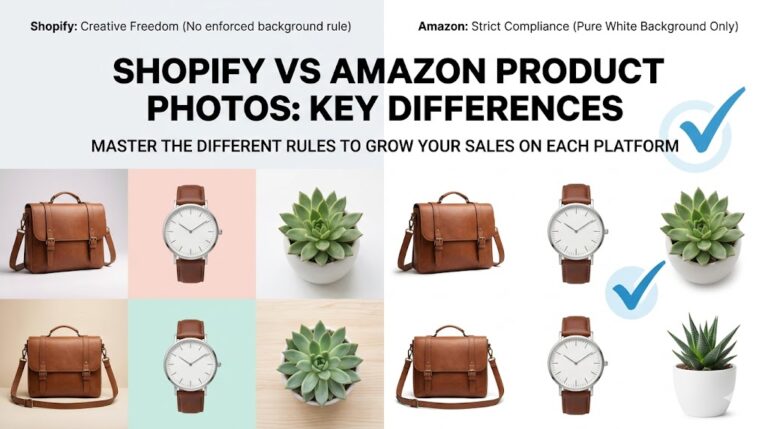
WooCommerce does not enforce strict image requirements the way Amazon or Etsy does, but that flexibility can work against you if you upload unoptimized images. Large, uncompressed product photos slow down your store, hurt your Core Web Vitals scores, and push your site down in Google search rankings. On top of that, blurry or poorly edited images reduce buyer confidence and increase bounce rates.
Studies consistently show that high-quality product images directly impact conversion rates. Shoppers are more likely to purchase when they can clearly see product details, view multiple angles, and zoom in for a closer look. A well-optimized image does all of this while keeping your store fast and SEO-friendly.
WooCommerce Product Image Optimization: Recommended Image Sizes
WooCommerce uses three main image types across your store: the catalog image shown in product listings, the single product image displayed on individual product pages, and the product thumbnail used in carts and widgets. By default, WooCommerce recommends uploading images at 800 x 800 pixels or larger, with a square aspect ratio being the safest choice for consistency across your catalog.
Best Image File Formats for WooCommerce Product Image Optimization
Choosing the right file format is a foundational part of image optimization. JPEG is the most commonly used format for product photos because it offers a good balance between image quality and file size. PNG is better suited for images that require transparent backgrounds, such as product cutouts or logos. WebP is the modern format of choice, offering superior compression without visible quality loss — and WordPress has supported WebP uploads since version 5.8.
As a general rule, use WebP as your primary format when possible, fall back to JPEG for older compatibility needs, and use PNG only when transparency is required. Avoid uncompressed TIFF or BMP files — these formats are far too large for web use.
For more detailed technical guidance, refer to Google’s official image optimization guidelines and the WordPress image format documentation for best practices.
WooCommerce Product Image Optimization: How to Compress Without Losing Quality
Image compression is the single most effective way to speed up your WooCommerce store. Unoptimized product images are often the largest page assets, and reducing their file size can dramatically improve your page load times. There are two types: lossy compression (permanently removes some data) and lossless compression (reduces size without visible quality loss).
For WooCommerce product images, a combination of both works best. Use tools like Smush Pro, ShortPixel, or Imagify to automatically compress images as you upload them. These plugins also offer bulk compression for your existing media library.
The Importance of Clean, Professional Product Photo Editing
Compression and file format choices take care of the technical side of WooCommerce product image optimization, but the visual quality of your images is equally important. A professionally edited product photo — with a clean background, accurate colors, proper exposure, and sharp focus — builds trust and communicates quality to your shoppers.
Background removal is one of the most impactful edits you can make. Placing your product on a clean white or transparent background removes distractions and gives your store a polished, professional look. Color correction ensures that product colors appear accurate on screen — critical for fashion, home decor, and cosmetics.
Writing SEO-Friendly Alt Text for WooCommerce Product Images
Alt text (alternative text) is a written description of an image that search engines use to understand what the image shows. It also serves as a fallback when images fail to load and improves accessibility for visually impaired shoppers. Adding descriptive, keyword-rich alt text to every product image is one of the easiest WooCommerce SEO wins available.
When writing alt text, be specific and descriptive. Instead of writing “red shoe,” write “women’s red leather ankle boot with 3-inch heel.” Include your primary keyword naturally, but avoid keyword stuffing. You can add alt text directly in the WordPress media library or within the product editor.
WooCommerce Product Image Optimization: Using Multiple Images and Gallery Views
WooCommerce allows you to add a main product image plus a gallery of additional images for each product. Take full advantage of this feature. Shoppers want to see products from multiple angles, in different colors or configurations, and in real-life context. Providing a comprehensive gallery reduces uncertainty and lowers your return rate.
As a best practice, include at least four to six images per product: a clean front-facing hero image, a back or side view, a close-up of key details or textures, a lifestyle or in-use shot, and size or scale reference images where relevant.
Enabling Lazy Loading for Faster Store Performance
Lazy loading is an important aspect of WooCommerce product image optimization that delays image loading until needed. This significantly reduces initial page load time. WordPress has included native lazy loading since version 5.5, and WooCommerce product images benefit from this automatically.
If you want more control, plugins like WP Rocket offer advanced lazy loading options, including for background images and iframes. Enabling these settings can further improve your Largest Contentful Paint (LCP) score — a key Core Web Vitals metric.
Using a CDN for WooCommerce Product Image Optimization
A CDN stores copies of your images on servers distributed around the world and delivers them to shoppers from the closest server. This reduces image load times for international visitors and helps your store perform consistently fast regardless of where your customers are located.
Smush Pro, already installed on your WooCommerce store, includes CDN delivery for images as part of its feature set — enabling a straightforward way to speed up image delivery globally without any complex technical setup.
Common WooCommerce Product Image Optimization Mistakes to Avoid
Many store owners unknowingly undermine their image optimization efforts. Uploading images in inconsistent sizes or aspect ratios creates a messy, unprofessional look. Using low-resolution images that appear pixelated when zoomed damages buyer trust. Neglecting alt text leaves significant SEO value on the table.
Another common mistake is over-compressing images to the point where quality visibly degrades. Aim for product images that are under 200KB without any visible compression artifacts. If you are unsure whether your edited images meet professional standards, working with a dedicated photo editing service can ensure consistent, high-quality results.
Final Thoughts: Invest in Your WooCommerce Product Images
WooCommerce product image optimization is not just a technical task — it is a direct investment in your store’s success. Fast-loading, professionally edited, and properly labeled product images improve your search rankings, increase buyer confidence, reduce return rates, and ultimately drive more sales.
🚀 Ready to Optimize Your WooCommerce Images?
At Photo Fix Team, we specialize in professional product photo editing for WooCommerce stores — background removal, color correction, ghost mannequin effects, and bulk image editing.
Get a Free Quote Today →