
If you run a Shopify store, your product images do more than fill space on a page. They shape first impressions, build trust, and directly affect how professional your store feels.
Shoppers often decide within seconds whether a product page looks credible. If your images are inconsistent, poorly cropped, low quality, or slow to load, they can hurt both user experience and conversions. On the other hand, clean and optimized product images can make your catalog look more polished and help customers feel more confident about buying.
This guide explains how to optimize product images for Shopify so your store looks better, loads smoothly, and presents products in a more professional way.
Why Shopify Product Image Optimization Matters
Shopify stores rely heavily on visual presentation. Product pages, collection pages, featured product blocks, and mobile browsing all depend on strong images.
Optimized Shopify product images help you:
- make your store look more professional
- improve visual consistency across product pages
- build customer trust
- support a better mobile experience
- avoid oversized or poorly cropped media
- create a cleaner catalog presentation
Shopify also supports multiple types of product media, including images, videos, and 3D models, and notes that richer product media can improve customer confidence and contribute to a better customer experience and more sales. Shopify also allows up to 250 media items per product.
What Good Shopify Product Images Should Do
Good Shopify product images should do more than look attractive. They should help customers quickly understand what the product is, what it looks like, and why it is worth buying.
Strong product images usually:
- show the product clearly
- maintain accurate color
- stay consistent across the catalog
- fit your theme layout properly
- look sharp on desktop and mobile
- support product trust
Shopify’s own guidance notes that high-quality product photography helps your store look more professional and can increase customer trust in your brand.
Use the Right Image Size and Aspect Ratio
One of the biggest Shopify image problems is inconsistency. Some product photos are too tall, some are too wide, and others are cropped badly. That makes collection pages and product grids look messy.
Shopify recommends using the correct image aspect ratio for how images are displayed in your theme, and also allows image crop and resize controls in theme settings.
Best practice:
Choose one consistent image ratio for your store and stick to it.
For example:
- square images for a clean catalog look
- portrait ratio for apparel
- landscape ratio only if your design clearly supports it
If your product catalog uses different image dimensions, your store can feel less organized.
Keep Product Images Consistent Across the Store
Consistency is one of the most important parts of Shopify product image optimization.
That includes:
- same background style
- similar crop spacing
- same lighting feel
- consistent color quality
- similar shadow style
- uniform image size
This is especially important for:
- apparel stores
- jewelry stores
- beauty brands
- furniture stores
- multi-product Shopify catalogs
When product images look consistent, your store feels more trustworthy and more premium.
Use Clean Backgrounds That Match Your Brand
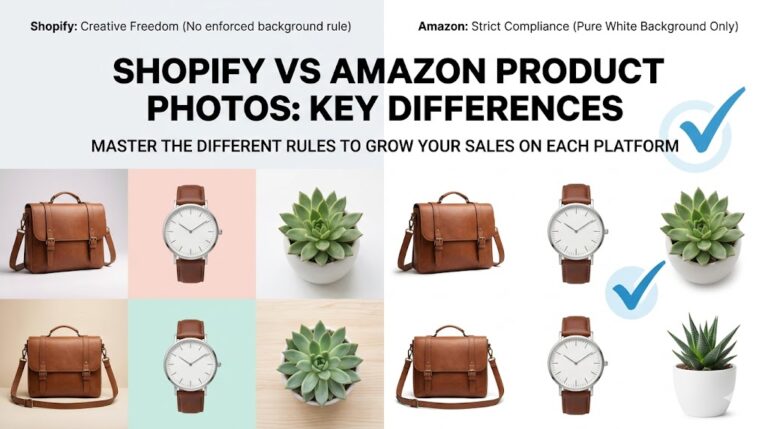
Unlike Amazon, Shopify gives you more creative freedom. You do not always need a pure white background.
That means you can use:
- white backgrounds
- light neutral backgrounds
- soft branded backgrounds
- lifestyle images
- flat lay images
- contextual product photos
But freedom does not mean inconsistency.
Choose a style that matches your store and apply it consistently. If one product has a white background, another has a dark scene, and another has a random crop, the collection page can feel unprofessional.
For many Shopify stores, the best approach is:
- clean product-only images for collection pages
- lifestyle or detail images on product pages
Make Sure Images Look Good on Mobile
A large share of Shopify traffic comes from mobile users, so your product images need to look good on smaller screens too.
That means:
- the product should be clearly visible
- important details should not be too small
- crops should not cut off the item awkwardly
- backgrounds should not distract from the product
When optimizing your images, always preview:
- collection pages on mobile
- product pages on mobile
- thumbnail appearance
- swipe gallery behavior
If your images only look good on desktop, they are not fully optimized.
Use Multiple Product Images Strategically
One image is rarely enough to sell a product well.
Use multiple product images to help customers understand:
- front view
- side view
- back view
- close-up details
- size and scale
- fabric or texture
- packaging
- product in use
Shopify supports product media beyond standard images, including video and 3D models, and notes that these can improve customer understanding of quality, function, and size.
For many stores, the best image sequence looks like this:
- clean hero image
- alternate angle
- close-up detail
- lifestyle image
- scale reference
- packaging or product feature shot
Optimize Image Quality Without Making Pages Heavy
Image quality matters, but oversized files can slow down your store if not handled carefully.
Shopify’s performance guidance highlights that store speed is affected by factors such as theme choice, apps, and third-party code. That means image optimization should be part of a broader performance mindset.
Best practice:
Use images that are:
- clear
- properly sized
- compressed carefully
- not unnecessarily huge
Your goal is to balance:
- image sharpness
- clean loading
- responsive display
- good browsing experience
If product images are too heavy, product pages and collection grids may feel slower, especially on mobile.
Keep Colors Accurate
Color accuracy is critical in eCommerce.
If your product looks different in the image than it does in real life, customers may:
- hesitate to buy
- leave negative reviews
- ask for returns
- lose trust in your store
This matters most for:
- apparel
- footwear
- jewelry
- beauty
- home decor
- furniture
Color correction should improve the image, not misrepresent the product.
Use Professional Editing to Improve Store Presentation
Many Shopify stores take decent product photos but still look inconsistent because the final editing is weak.
Professional editing can help with:
- background cleanup
- color correction
- dust and blemish removal
- edge cleanup
- shadow refinement
- crop consistency
- size alignment
- catalog uniformity
For stores with larger inventories, this becomes even more important. Consistent editing across many products can make the whole store feel more reliable and brand-ready.
You can also naturally link here to your eCommerce photo editing, product photo editing, background removal, and clipping path service pages.
Common Shopify Product Image Mistakes to Avoid
Here are some of the most common problems that make Shopify stores look less professional:
Using different image sizes
This makes collection pages feel uneven and messy.
Poor cropping
If products are too small, too large, or cut off badly, the store looks unpolished.
Too many different background styles
This weakens brand consistency.
Low-quality source photos
Blurry or dark product images reduce trust.
Overediting
Excessive contrast, oversaturation, or unrealistic colors can hurt credibility.
Not optimizing for the theme layout
Even a good image can look awkward if it does not fit the store design well.
Ignoring mobile display
Images need to work across both desktop and mobile.
Shopify vs Amazon Product Image Optimization
Shopify and Amazon are not the same, and product image strategy should reflect that.
Amazon:
- stricter compliance rules
- pure white main image often required
- tighter image standards for listings
Shopify:
- more branding flexibility
- more freedom for lifestyle images
- more design control
- more emphasis on overall store consistency
That means Shopify image optimization is not just about compliance. It is about building a store that looks polished, trustworthy, and easy to shop.
Best Tools for Shopify Product Image Optimization
To improve Shopify product images, you can use tools for:
Editing
- Photoshop
- Affinity Photo
- Canva
- GIMP
Background cleanup
- Remove.bg
- Clipping Magic
- Photoshop cutout tools
Compression
- TinyPNG
- ImageOptim
- ShortPixel
If you manage a large catalog, professional editing often becomes the faster and more consistent option.
Final Tips for Better Shopify Product Images
Before publishing or updating a product page, ask:
- Do all product images match in style?
- Is the crop consistent?
- Do the images fit the theme layout properly?
- Are the files clear without being too heavy?
- Do the colors look realistic?
- Are the product details easy to understand?
- Does the page feel visually trustworthy?
Small improvements in product image quality can make a noticeable difference across the store.
Conclusion
Shopify product image optimization is not just about resizing pictures. It is about creating a cleaner, more consistent, and more trustworthy shopping experience.
When your images are optimized well, your store looks more professional, your catalog feels more organized, and customers can understand products more easily. That can help improve confidence, strengthen brand presentation, and support better conversions over time.
If you want your Shopify store to look polished and ready to compete, product image optimization should be one of your priorities.
Frequently Asked Questions
Find answers to commonly asked questions about our products and services.