When you sell online, your product image has to do a lot of work. It needs to catch attention, look clean, build trust, and help shoppers understand exactly what they are buying. That is why background removal and product image editing matter so much.
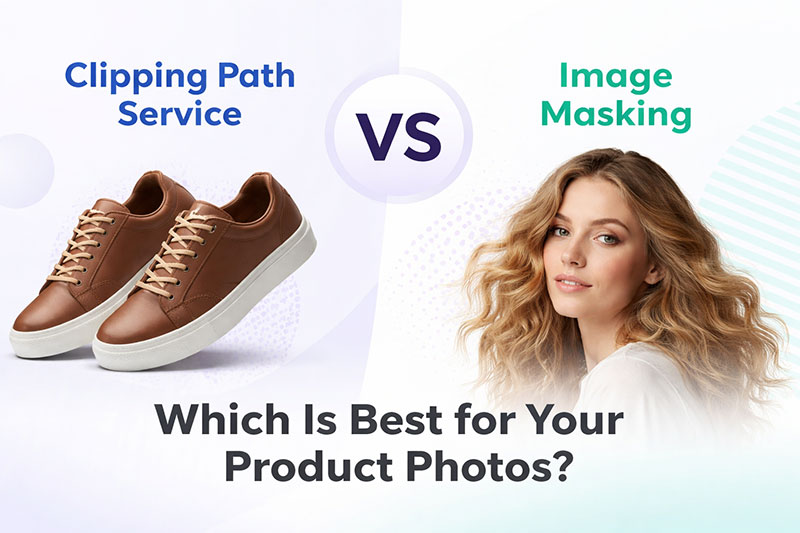
But many store owners, photographers, and marketers get confused when choosing between clipping path service vs image masking. Both are used to separate a subject from its background. Both can create polished, professional-looking images. But they are not the same, and choosing the wrong one can affect image quality, turnaround time, and cost.
In this guide, we will break down the difference in simple terms. You will learn what each method does, when to use it, and how to decide which one is best for your product photos.
What Is a Clipping Path Service?
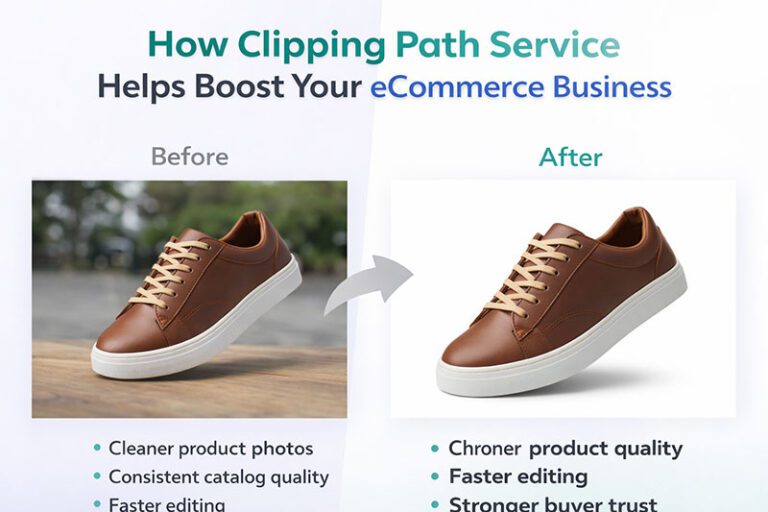
A clipping path service is a manual photo editing technique used to cut out an object from its background using a precise vector path. Editors usually create this path with the Pen Tool in Photoshop.
This method works best when the object has clean, solid, well-defined edges. Once the path is created, the product can be placed on a white background, transparent background, or any custom background you want.
Common uses of clipping path service
- Removing background from shoes, bags, bottles, boxes, and electronics
- Creating white background product photos
- Isolating products for Amazon, Shopify, and catalog use
- Making clean cutouts for ads and banners
- Editing multiple product images with consistent edges
Why businesses use clipping path
For eCommerce brands, clipping path is one of the most reliable methods for making product photos look neat and marketplace-ready. It gives sharp edges, consistent results, and high control over the final output.
What Is Image Masking?
Image masking is a photo editing method used when the edges of a subject are too soft, detailed, or complex for a clipping path alone. Instead of drawing only a hard vector path, masking allows editors to preserve delicate details like:
- Hair
- Fur
- Feathers
- Fabric transparency
- Soft or fuzzy edges
- Sheer materials
- Smoke or semi-transparent objects
Masking is often the better choice when a simple cutout would make the image look unnatural.
Common uses of image masking service
- Removing backgrounds from models with loose hair
- Isolating furry or fluffy products
- Editing sheer clothing, lace, or veils
- Keeping transparent parts of glass or fabric realistic
- Preserving fine edge details in high-end product photos
Clipping Path Service vs Image Masking: What Is the Main Difference?
The easiest way to understand clipping path service vs image masking is this:
- Clipping path is best for hard, clean edges
- Image masking is best for soft, detailed, or transparent edges
A clipping path creates a precise outline around an object. Image masking works more like a controlled blend, helping retain natural detail where a hard path would look rough or unrealistic.
Quick comparison table
| Feature | Clipping Path Service | Image Masking |
|---|---|---|
| Best for | Solid objects with clean edges | Hair, fur, fabric, transparency |
| Edge style | Hard and sharp | Soft and natural |
| Accuracy on fine details | Limited | Excellent |
| Editing speed | Faster | More time-consuming |
| Cost | Usually lower | Usually higher |
| Typical products | Shoes, electronics, bottles, boxes | Apparel on models, furry products, sheer fabrics |
This comparison is why the right choice depends on the type of image you want to edit, not just the goal of removing the background.
When Should You Use a Clipping Path Service?
A clipping path service is the better option when your product has a clear, smooth shape. It is especially useful for bulk eCommerce image editing because it is accurate, efficient, and scalable.
Use clipping path for:
1. Products with solid edges
If the outline of the product is clean and easy to define, clipping path works extremely well.
Examples:
- Watches
- Sunglasses
- Furniture
- Cosmetics
- Kitchen tools
- Mobile phones
2. White background product listings
Many online marketplaces require clean product images on plain backgrounds. A clipping path helps create that polished look.
3. Bulk image editing jobs
If you have hundreds or thousands of product images, clipping path is usually more efficient than masking.
4. Multi-purpose marketing assets
Once the product is separated cleanly, you can use it in ads, catalogs, landing pages, and social posts.
When Should You Use Image Masking?
Image masking is better when the product or subject has details that cannot be cut accurately with a hard edge.
Use image masking for:
1. Hair and fur
This is one of the most common reasons to use masking. Hair strands and fur details are too fine for a regular clipping path.
2. Transparent or semi-transparent products
If you are editing a veil, net fabric, glassware, or sheer clothing, masking keeps the transparency more natural.
3. Soft edges
Some materials do not have crisp borders. A path can make them look fake or jagged, while masking preserves realism.
4. Fashion and model photography
Model photos often include loose hair, flowing dresses, soft fabric edges, and shadows that need advanced treatment.
Real Examples: Which Method Fits Which Product?
To make this even easier, here are some common product categories and the best editing approach.
Best for clipping path
- Shoes
- Handbags
- Boxes and packaging
- Electronics
- Jewelry with solid edges
- Home decor items
- Sports equipment
Best for image masking
- Models with curly or loose hair
- Faux fur jackets
- Soft toys
- Feathered accessories
- Sheer dresses
- Veils and lace products
- Fabric with loose threads
Sometimes both are used together
Some images need both techniques. For example, a clothing image may need a clipping path for the body of the garment and masking for delicate fabric or hair near the neckline.
That is why experienced editors often choose the method based on the specific edge details in each image, not just one blanket process.
Which Option Is Better for eCommerce Businesses?
For most online stores, the answer depends on what you sell.
If your catalog includes products like bottles, gadgets, shoes, or household items, clipping path for product images is usually the better fit. It is fast, clean, and cost-effective.
If you sell fashion, accessories with soft materials, or products photographed on models, image masking service may give you better quality.
For many eCommerce businesses:
- Clipping path is better for daily product catalog editing
- Masking is better for premium visuals and complex images
For growing brands, this is not just a technical choice. It affects:
- image quality
- editing cost
- turnaround time
- consistency across product listings
- conversion-focused presentation
Can Clipping Path and Image Masking Be Used Together?
Yes, and in many cases, they should be.
A skilled editor may use:
- clipping path for the main object
- masking for soft edges
- shadow creation for realism
- retouching for dust, wrinkles, or color issues
This combined approach is common in professional product image editing because it gives a cleaner result without sacrificing detail.
For example:
- A jacket photo may need clipping for the body and masking for fuzzy fabric edges
- A mannequin apparel photo may need clipping, masking, and ghost mannequin editing
- A beauty product with a ribbon may need clipping for the bottle and masking for the ribbon fibers
How to Choose the Right Service for Your Images
If you are unsure whether to choose clipping path or masking, ask these questions:
1. Does the object have hard or soft edges?
- Hard edges = clipping path
- Soft edges = masking
2. Is there hair, fur, or transparency?
If yes, masking is often the safer choice.
3. How many images do you need edited?
For high-volume product catalogs, clipping path may save time and budget.
4. What level of detail matters to your brand?
Premium brands often need more refined cutouts, especially in fashion and beauty photography.
5. Where will the image be used?
Marketplace listings, ads, banners, print catalogs, and social campaigns may each require different finishing quality.
Why Outsourcing Photo Editing Makes Sense
Many eCommerce teams try to handle background removal in-house, but that often leads to inconsistent results and wasted time. Professional editing services offer a more reliable process.
Benefits of outsourcing:
- Consistent edge quality across all images
- Faster turnaround for large batches
- Better handling of complex product details
- More time for your team to focus on sales and growth
- Access to experts who know when to use clipping path vs masking
For businesses that need clean, accurate product photos every week, outsourcing is usually more practical than doing everything manually in-house.
Why This Choice Matters More Than Many Store Owners Realize
A bad cutout is easy to notice. Jagged edges, missing strands, unnatural transparency, or rough product outlines can make even a great product look low quality.
Shoppers may not know whether you used clipping path or image masking, but they absolutely notice when the image looks off.
- look more professional
- build customer trust
- create a stronger brand identity
- improve listing consistency
- support better click-through and conversion performance
Final Thoughts on Clipping Path Service vs Image Masking
When comparing clipping path service vs image masking, there is no one-size-fits-all answer. The right choice depends on the subject, the edge detail, and the quality you want in the final image.
Choose clipping path service when you need sharp, clean cutouts for solid products. Choose image masking when you need to preserve hair, fur, transparency, or other fine details. And for many professional eCommerce photos, using both methods together delivers the best result.
If you want clean, conversion-ready product photos without trial and error, Photo Fix Team can help you choose the right editing process for every image. Whether you need bulk clipping path work, advanced image masking, or full eCommerce photo editing support, the goal is always the same: product images that look professional and help your store sell better.
Frequently Asked Questions
Find answers to commonly asked questions about our products and services.