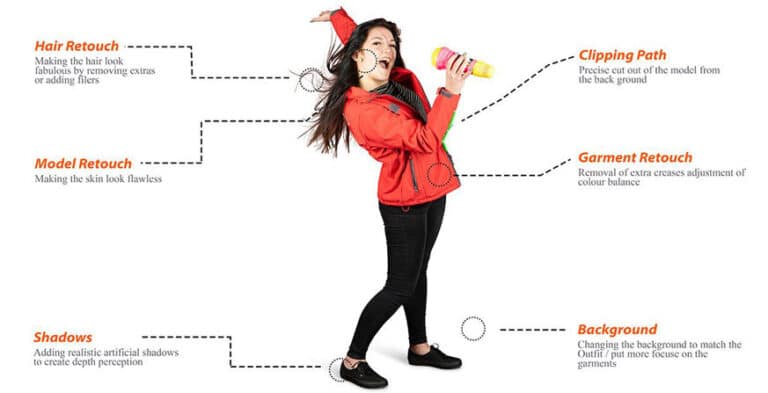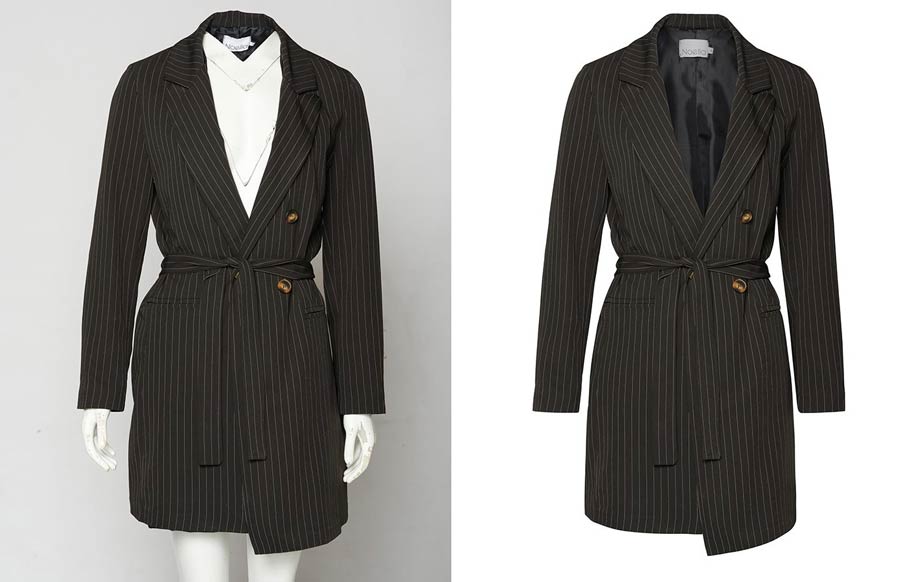

If you want to remove background from product photos and give your e-commerce store a professional edge, you have come to the right place. Clean, distraction-free product images are no longer optional — they are essential for boosting conversions, meeting marketplace requirements, and building customer trust. Whether you sell on Amazon, Shopify, Etsy, or WooCommerce, professional product photo background removal is the single most impactful image editing technique you can apply to your catalog.
Why You Need to Remove Background from Product Photos
Online shoppers cannot physically touch or inspect a product before buying. What they see in your product images is all they have to judge quality, value, and trustworthiness. The most effective way to remove background from product photos is to replace cluttered or distracting backgrounds with a clean white or transparent backdrop — putting the entire spotlight on your product and making it look professional, polished, and premium.
Beyond aesthetics, many major e-commerce platforms enforce strict image guidelines. Amazon requires product images to have a pure white background (RGB 255, 255, 255). Google Shopping, Walmart Marketplace, and eBay all have similar requirements. Failing to comply can result in listing rejections or suppressed search rankings — directly costing you sales.
Key Benefits of Background Removal for E-Commerce
- Higher conversion rates: Clean images reduce visual noise and help customers focus on the product, leading to more purchase decisions.
- Marketplace compliance: Meet Amazon, eBay, Walmart, and Google Shopping image policies to avoid listing penalties.
- Brand consistency: A uniform white or transparent background across your catalog creates a cohesive, professional look that builds brand trust.
- Faster page load times: Transparent PNG backgrounds are often smaller in file size, improving site speed and SEO performance.
- Versatile image usage: Transparent backgrounds let you place products on any surface — white, colored, lifestyle, or seasonal promotional backgrounds.
Top Methods to Remove Background from Product Photos
There are several proven methods to remove background from product photos, each with its own advantages and limitations. Understanding these methods helps you choose the right workflow for your business volume, budget, and quality requirements.
1. Manual Clipping Path Using Photoshop Pen Tool
The clipping path technique is the gold standard for product image background removal. A professional photo editor uses Adobe Photoshop’s Pen Tool to draw a precise vector path around the product edges. This path is then converted into a selection, and the background is removed or replaced. The result is pixel-perfect accuracy — even for complex shapes, curved edges, jewelry, glasses, and products with detailed outlines.
This method is best suited for: product catalogs requiring consistent, high-quality results; marketplace listings on Amazon, Shopify, or Etsy; fashion photography; electronics; furniture; and any product with defined edges. While this is the most accurate method, it is also time-intensive if done in-house, which is why many e-commerce businesses outsource their background removal to professional photo editing services.
2. Background Eraser Tool and Magic Wand
Photoshop’s Background Eraser Tool and Magic Wand are faster alternatives for images with simple, high-contrast backgrounds. The Magic Wand selects pixels based on color similarity, making it ideal for products shot against solid-color backgrounds. The Background Eraser samples and removes colors along brush strokes. While quick, these tools may struggle with fine details like hair, fur, transparent products, or objects with similar tones to the background.
3. AI-Powered Automatic Background Removal Tools
Artificial intelligence has revolutionized ecommerce photo editing. Tools like Remove.bg, Adobe Firefly, and Canva’s background remover use deep learning algorithms to automatically remove background from product photos in seconds. These tools work exceptionally well for simple product shots and can process thousands of images in bulk through API integrations. However, AI tools can struggle with complex edges, reflective surfaces, or products with intricate details — situations where manual clipping path editing still delivers superior results.
4. Photoshop Select Subject and Refine Edge
Adobe Photoshop’s Select Subject feature (powered by Adobe Sensei AI) automatically identifies and selects the main subject in an image. Combined with the Refine Edge / Select and Mask workspace, this method handles complex edge cases — including hair, fur, and transparent objects — with impressive precision. It strikes an excellent balance between speed and quality, making it a popular choice for professional e-commerce photo editors who need to process medium volumes of images efficiently.
Best Practices for Professional Product Image Background Removal
Achieving a flawless white background product image requires more than simply clicking a button. When you remove background from product photos, you need to follow best practices to ensure your images meet professional standards and marketplace requirements:
- Start with quality source images: Always shoot products against a clean, well-lit background — preferably white or light gray. Good lighting reduces shadows and color casts, making background removal faster and more accurate.
- Shoot in RAW format: RAW files preserve more image data, giving editors greater flexibility when creating selections and removing backgrounds without loss of detail.
- Save as PNG with transparency: When removing backgrounds for web use, always save the final image as a PNG file to preserve transparency. This allows flexible placement on any background color.
- Match platform specifications: Amazon requires 85% of the image frame to be occupied by the product on a pure white background. Always check the specific image guidelines for each marketplace you sell on.
- Add natural shadows: After removing the background, consider adding a subtle drop shadow or reflection effect. This grounds the product visually and prevents it from looking like it is floating in space.
- Maintain consistent margins: Keep consistent spacing between the product edges and image borders across your entire catalog for a uniform, professional appearance.
DIY vs. Professional Photo Background Removal Services
One of the biggest decisions e-commerce sellers face is whether to remove background from product photos themselves or to outsource the work to a professional photo editing service. Both approaches have their place depending on your business stage, volume, and quality requirements.
When to Use DIY Background Removal
- You have a small catalog of fewer than 50 products and want to keep costs down.
- Your budget is extremely tight and you have time to learn photo editing software.
- You sell products with simple shapes against high-contrast backgrounds.
- You are comfortable using AI tools or basic Photoshop features for straightforward edits.
When to Use Professional Background Removal Services
- You have a large catalog with hundreds or thousands of SKUs that need consistent editing.
- Your products have complex shapes — jewelry, clothing, electronics, glasses, or transparent items.
- You need pixel-perfect, marketplace-compliant results for Amazon, Shopify, or Etsy listings.
- You want to free up your time to focus on sales, marketing, and business growth rather than image editing.
- You require fast turnaround times — often 24 to 48 hours for bulk orders.
Professional photo editing companies like Photo Fix Team offer affordable, high-volume product photo editing services including background removal, clipping path, shadow creation, color correction, and ghost mannequin effects. Outsourcing to experts ensures consistent quality at scale while keeping your cost per image extremely competitive.
How Background Removal Impacts E-Commerce SEO and Conversions
Many e-commerce sellers focus only on the visual impact of clean product images, but choosing to remove background from product photos also delivers significant SEO and conversion rate benefits. Search engines like Google use image signals — including alt text, file name, page speed, and image quality — as ranking factors for both organic search and Google Shopping results.
From a conversion rate optimization perspective, studies consistently show that professional product images directly influence purchase decisions. Shoppers are more likely to buy a product when they can clearly see it without background distractions. A/B tests across major e-commerce platforms demonstrate that listings with clean, professionally edited images consistently outperform those with cluttered or amateurish backgrounds — often by 20 to 40 percent in conversion rates.
Step-by-Step: How to Remove Background from Product Photos in Photoshop
Here is a simplified step-by-step workflow to remove background from product photos using Adobe Photoshop:
- Step 1 — Open your image: Import your product photo into Photoshop. Duplicate the background layer (Ctrl+J) before making any changes to preserve the original.
- Step 2 — Select the subject: Go to Select > Subject to let Photoshop automatically detect the product. For better accuracy, use the Pen Tool to manually trace complex edges.
- Step 3 — Refine the selection: Open Select and Mask (formerly Refine Edge) to clean up the selection boundaries. Use the Refine Hair brush for fine edges and adjust the Feather and Contrast sliders for smooth transitions.
- Step 4 — Remove the background: With the selection active, click the Add Layer Mask button in the Layers panel. This hides the background without permanently deleting it, giving you the flexibility to restore it if needed.
- Step 5 — Clean up manually: Zoom in and paint on the layer mask with a black or white brush to fix any areas the automatic selection missed.
- Step 6 — Add a white or transparent background: Create a new solid color layer below your product layer, set to white for marketplace listings or leave transparent for flexible use.
- Step 7 — Export the file: Save as PNG-24 for transparent backgrounds, or flatten the image and save as JPEG for white backgrounds. Optimize file sizes for web performance.
Conclusion: Make Background Removal Your Competitive Advantage
Learning to remove background from product photos is one of the most valuable investments you can make as an e-commerce seller. Clean, professional product images build credibility, satisfy marketplace requirements, improve your search rankings, and ultimately drive more sales. Whether you choose to master the craft yourself using tools like Adobe Photoshop and AI-powered platforms, or you partner with a professional photo editing service for reliable, high-volume results, prioritizing image quality will always pay dividends.
At Photo Fix Team, we specialize in fast, affordable, and pixel-perfect product photo background removal for e-commerce businesses of all sizes. From individual listings to full catalog editing at scale, our expert team delivers consistent, marketplace-compliant results with a quick turnaround. Ready to transform your product images and grow your online store? Get in touch with us today for a free quote.
🚀 Ready to Grow Your eCommerce Business with Professional Clipping Path Services?
Photo Fix Team delivers fast, precise, and affordable clipping path services for eCommerce businesses of all sizes — background removal, white background compliance, ghost mannequin, shadow effects, color correction, and bulk catalog editing with guaranteed quality.
Get a Free Quote Today →