Choosing between DIY vs professional ecommerce photo editing directly impacts three things every online store cares about: conversion rate, launch speed, and catalog compliance. According to Baymard Institute’s Product Page UX Research, 51% of ecommerce sites still fail to achieve even “decent” product page UX, and up to 62% of leading stores show mediocre or worse product page performance—with inconsistent, unclear, or unpolished visuals being one of the fastest ways to erode buyer trust.
On the surface, editing your own product photos looks free. You already pay for Photoshop, Lightroom, or an AI background remover, so handling edits in-house seems like smart bootstrapping. Yet once you factor in labor hours, marketplace rejections on Amazon or Walmart, and mismatched collection grids on Shopify, “free” DIY editing often becomes the most expensive bottleneck in your store.
This 2027 guide breaks down the real cost-per-image math, compares DIY Manual vs. DIY AI Tools vs. Professional Human Editing, and maps out exactly where DIY breaks down across all six major ecommerce platforms—so you can pick the workflow that actually grows your margin.
DIY vs Professional Ecommerce Photo Editing: Quick 2027 Comparison
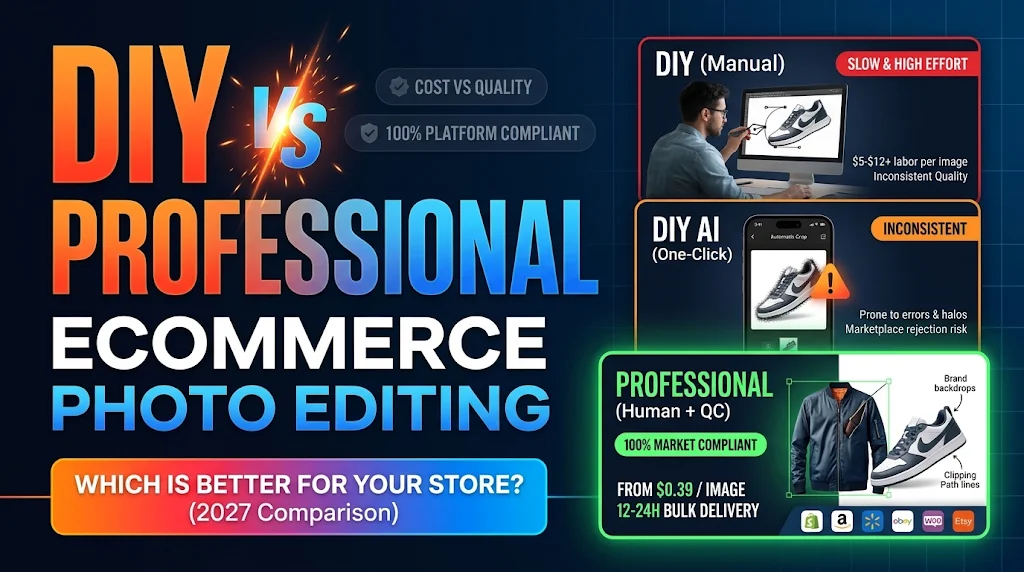
In 2027, sellers are no longer deciding between just Photoshop and an agency. Most stores choose between three distinct workflows: manual DIY editing, AI-assisted DIY apps, or dedicated professional ecommerce photo editing teams.
| Factor | Manual DIY (Photoshop / Lightroom) | DIY AI Tools (Canva / Photoroom / Firefly) | Professional Ecommerce Editing (Human + QC) |
| Direct Cash Cost | $10–$60/mo software | $15–$80/mo credits/plan | From $0.39/image (bulk discounts on 500+ images) |
| Hidden Labor Cost | Very High ($6–$15+/image in time) | Low–Medium (review & fixes needed) | Minimal (upload & approve) |
| Edge & Cutout Accuracy | Depends entirely on skill | Prone to halos on hair, glass, jewelry, lace | Hand-drawn clipping paths & clean masking |
| Catalog Consistency | Hard to maintain across shoots | Inconsistent shadows & color shifts | Standardized style guide across 50 to 50,000+ SKUs |
| Marketplace Compliance | High risk of Amazon/Walmart rejections | Frequent subtle RGB/padding errors | Built specifically around platform rules |
| Turnaround (500 Images) | Weeks of internal bottlenecks | Hours (plus heavy manual cleanup) | 24–48 hours (same-day rush available) |
| Best For | Hobby shops, <20 SKUs/month | Quick social mockups & early testing | Scaling DTC brands, multi-channel sellers, studios |
The Real Cost Math: Is DIY Actually Cheaper?
The biggest blind spot in the DIY vs professional ecommerce photo editing debate is ignoring opportunity cost.
Suppose you launch 100 new product images for a seasonal drop. Each image needs background removal, dust cleanup, true-to-life color correction, natural shadow creation, and resizing for your storefront and marketplaces:
- Manual DIY Workflow: Even an experienced in-house marketer takes 10–15 minutes per image to isolate edges cleanly, fix colors, align margins, and export multiple platform sizes. That is 17 to 25 hours for 100 photos. Valued at a modest $30/hour, your “free” DIY editing actually costs $510 to $750—or $5.10 to $7.50 per image—while pulling focus away from paid ads, SEO, and inventory.
- DIY AI Tool Workflow: One-click AI cutouts are fast for simple, solid-edged boxes. However, industry testing shows that once you include re-renders, fixing clipped shadows, correcting color shifts, and manually repairing reflective or apparel edges, accepted listing images still absorb significant review time—and often fail strict marketplace inspections.
- Professional Outsourced Editing: Dedicated production studios like Photo Fix Team start at $0.39 per image for clean background removal and clipping paths, with industry benchmarks for advanced retouching, ghost mannequin, and complex masking typically landing between $0.69 and $1.19+ per image depending on complexity. Editing all 100 images professionally often costs $39 to $150 total, delivered in 24–48 hours with zero internal labor drain.
The takeaway: DIY saves cash only when your volume is tiny and your time has zero alternative value. The moment you cross 30–50 images per month, outsourcing delivers a higher ROI almost immediately.
Where DIY Fails: Platform-by-Platform Compliance Reality Check
One of the strongest reasons multi-channel sellers switch from DIY to photo editing for ecommerce platforms is that every marketplace enforces completely different image rules. Uploading one generic DIY export everywhere leads to suppressed listings, blurry thumbnails, and lower search visibility.
| Platform | Strict Image Rules & Specs | Where DIY Commonly Breaks | Best Editing Approach |
| Amazon | Pure white (RGB 255,255,255), 85%+ frame fill, min 1500×1500 px (2000+ px ideal), zero props/text on main image | Slightly off-white backgrounds (RGB 250), harsh jagged cutouts, or wrong frame fill causing ASIN suppression | Amazon Photo Editing Services for first-pass compliance & A+ infographics |
| Shopify | Flexible backgrounds, 2048×2048 px square (or 4:5 portrait), uniform aspect ratios & fast WebP/JPEG weight | Mixed lighting, inconsistent crop margins, and heavy PNGs that wreck collection grids and Core Web Vitals | Shopify Product Image Editing aligned to one brand style guide |
| Walmart | Policy-safe pure white background, 2000×2000 px zoom-ready square, zero watermarks or overlays | Failing Walmart’s Listing Quality Score due to weak zoom resolution or variant mismatches | Walmart Product Image Editing with strict zoom & batch naming |
| Etsy | Flexible/warm lifestyle aesthetic, 2000 px shortest side, authentic handmade context | Over-processed AI filters that look fake or cluttered lighting that kills mobile click-through rates | Hybrid or Etsy Photo Editing Services for natural polish |
| eBay | White preferred, 1600 px longest side, clean multi-angle shots without dust or glare | Distracting home backgrounds, harsh flash reflections, and low trust on competitive/reseller listings | eBay Listing Photo Editing for glare removal & crisp detail |
| WooCommerce | Flexible (800–1500+ px), lightweight WebP/JPEG for WordPress speed + Google Merchant Center compliance | Uncompressed camera uploads slowing WordPress LCP scores and inconsistent store thumbnails | WooCommerce Product Image Editing for speed + SEO readiness |
If you sell on just one handmade Etsy shop with 10 products, DIY is realistic. If you sell across Amazon, Shopify, and Walmart simultaneously, maintaining separate crops, backgrounds, and file weights manually becomes an operational nightmare.
What About AI Photo Editing Apps? (DIY AI vs. Human Specialists)
In 2027, many sellers ask whether AI background removers eliminate the need for professional retouchers. The honest answer is no—AI handles the easy 60%, while human specialists protect the revenue-driving 40%.
Where DIY AI Tools Work Well
- Quick mockups for social media ads or A/B testing new concepts.
- Simple, matte, hard-edged items (books, sealed boxes, flat packaging).
- Rough internal drafts before a full catalog shoot.
Where AI Fails and Human Editors Win
- Apparel & Fashion: AI struggles to reconstruct inner neck labels and natural 3D drape—tasks that require precision Ghost Mannequin Service.
- Jewelry, Glass & Reflective Surfaces: Automated tools routinely erase metallic highlights, warp gemstones, or leave gray halos around transparent bottles.
- Complex Edges (Hair, Fur, Lace, Mesh): Fine textures demand manual Image Masking Service and hand-drawn Clipping Path Service work.
- Color-Critical Products: Cosmetics, fashion, and home decor require calibrated color matching. Even a slight tint shift causes high return rates.
- Realistic Depth: AI drop shadows often look pasted-on or float unnaturally, whereas skilled Shadow & Reflection Editing grounds the product realistically.
When DIY Product Photo Editing Still Makes Sense
Despite the advantages of outsourcing, DIY is still the right move in specific early-stage scenarios:
- You are validating your first 5–15 SKUs: When testing product-market fit on a shoestring budget, speed and zero cash outlay matter more than studio perfection.
- Your products are ultra-simple: Flat, matte, hard-edged items require minimal retouching.
- You already employ a dedicated in-house designer: If you have unused studio capacity on payroll and low monthly SKU turnover, keeping edits internal makes sense.
- You want hands-on learning: Editing your first few batches teaches you what clean margins, lighting, and zoom clarity look like—making you a better buyer when you eventually outsource.
When Professional Ecommerce Photo Editing Is the Better Investment
Outsourcing stops being an expense and becomes a profit lever as soon as you hit any of these milestones:
- Consistent Monthly Uploads (50+ Images/Month): Bulk workflows save dozens of hours every month and keep seasonal launches on schedule.
- Multi-Channel Expansion: Preparing one shoot simultaneously for Amazon, Shopify, Walmart, and Google Shopping requires platform-specific exports.
- High-Return Categories: Apparel, footwear, jewelry, cosmetics, and furniture rely heavily on color accuracy, crisp macro textures, and “in-scale” clarity (Baymard notes 28% of major sites still neglect “In Scale” imagery, leaving easy conversion gains on the table).
- Inconsistent Collection Grids: When photos shot in different weeks look mismatched side by side on collection pages, shoppers subconsciously downgrade your brand’s perceived value.
- High-Value Team Bottlenecks: Founders, marketers, and photographers earn far more focusing on customer acquisition, Shopify’s product presentation fundamentals, and merchandising than clicking pen-tool paths at midnight.
The Smartest Strategy for Growing Brands: The Hybrid Workflow
For most scaling ecommerce brands (50 to 500 SKUs), the winning answer to DIY vs professional ecommerce photo editing isn’t all-or-nothing—it’s a hybrid workflow.
What Your Team Keeps In-House
- Product styling and raw photo capture (following a simple repeatable lighting setup).
- Selecting winning angles and organizing SKU folders.
- Quick ad-hoc social graphics or flash-sale banners.
- Final brand sign-off.
What You Outsource to Specialists
- Precision Background Removal and hand-drawn clipping paths.
- Dust, wrinkle, glare, and blemish retouching via dedicated Product Photo Editing.
- Ghost mannequin neck joints and realistic shadow/reflection creation.
- Exact color matching and multi-platform batch exports (JPEG, PNG, WebP) named to your SEO spec.
This hybrid model keeps full creative ownership inside your brand while offloading the slow, repetitive pixel work to a team capable of scaling from 50 to 10,000+ images per week with multi-step QC and optional NDA protection.
5-Point Decision Checklist for Store Owners
Run your store through these five quick checks to decide today:
- Monthly Volume: Under 20 simple images? DIY works. Over 50 images or frequent drops? Go Pro or Hybrid.
- Product Complexity: Boxes and flat items? DIY/AI can pass. Apparel, jewelry, glass, or textured goods? Use Pro Human Editing.
- Sales Channels: Single casual storefront? DIY is flexible. Selling on Amazon, Walmart, and Shopify together? Use Platform-Specific Pro Editing.
- Launch Speed: Are raw photos sitting in folders delaying product launches by weeks? Outsource immediately.
- Hourly Value: Is your team’s time worth more than $25/hour? If yes, spending hours on manual cutouts costs far more than paying from $0.39/image.
Ready to Compare DIY vs. Professional Quality Side by Side?
You do not need to guess whether professional retouching is worth it for your catalog—test it directly against your own DIY edits.
At Photo Fix Team, we specialize in photo editing for ecommerce platforms across Amazon, Shopify, Walmart, Etsy, eBay, and WooCommerce—with pricing starting at $0.39 per image, 24–48 hour turnaround (rush available), bulk discounts on 500+ images, and strict NDA privacy.
- Review our transparent Ecommerce Photo Editing Pricing
- Or Send a Free Test Edit with 1–2 of your raw product photos and compare the results against your DIY version in 24 hours.
Frequently Asked Questions (FAQ)
Is DIY photo editing good enough for ecommerce?
Yes, DIY editing is workable for new stores with fewer than 20 simple products per month, flexible launch timelines, and basic lighting needs. Once SKU volume rises or you expand to strict marketplaces like Amazon and Walmart, DIY quickly becomes a time and consistency bottleneck.
How much does professional ecommerce photo editing cost compared to DIY?
Professional background removal and clipping paths start around $0.39 per image, with advanced retouching, ghost mannequin, and complex masking typically ranging from $0.69 to $1.19+ per image depending on complexity. By comparison, manual DIY editing taking 10–15 minutes per photo costs $5 to $12+ per image in hidden founder or staff labor.
Can AI photo editing apps replace professional ecommerce photo editors?
AI apps are useful for quick social mockups and simple, matte products, but they frequently leave jagged edges, color inaccuracies, and unnatural shadows on apparel, jewelry, glass, and reflective items. Most growing brands use human retouchers—or a hybrid workflow—to pass strict marketplace quality checks and protect brand trust.
Which ecommerce platforms require professional editing the most?
Amazon and Walmart enforce the strictest automated compliance checks (pure white RGB 255,255,255 backgrounds, 1500–2000+ px zoom sizing, and zero overlays), while Shopify and WooCommerce brands rely on professional batch editing for uniform collection grids, accurate colors, and fast-loading WebP/JPEG files.
Can I combine DIY and professional ecommerce photo editing?
Yes. A hybrid workflow—where your team shoots raw product photos, selects angles, and manages creative direction while specialists handle background removal, color correction, shadows, ghost mannequin edits, and multi-platform exports—is the most cost-effective setup for growing stores.
Photo Fix Team delivers fast, pixel-perfect eCommerce photo editing for online stores, brands, and photographers — background removal, ghost mannequin, retouching, color correction, and bulk catalog editing.
✓ 24–48h Turnaround • ✓ 100% Quality Guarantee • ✓ No Credit Card Required